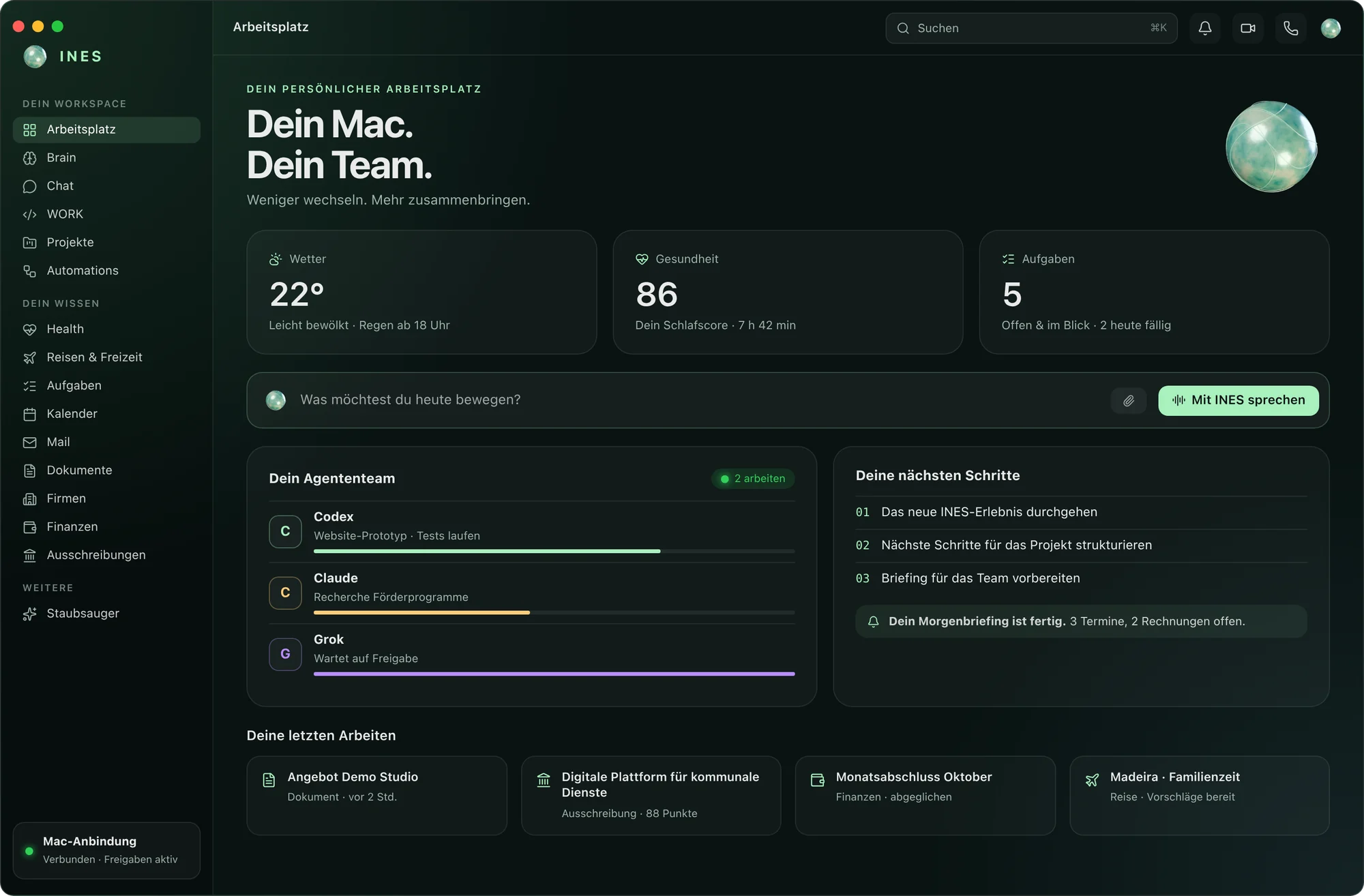

INES on the Mac: workspace with agent team and next steps
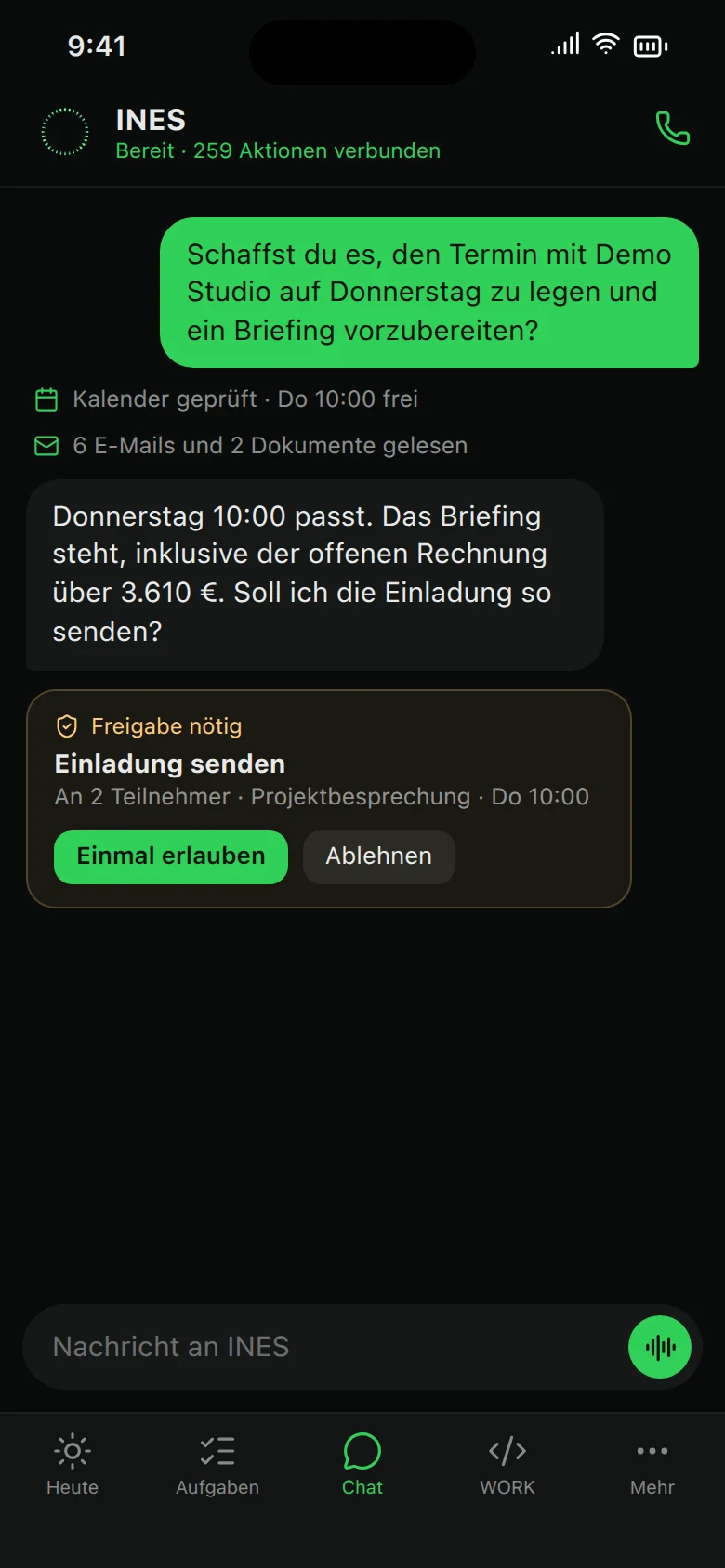
INES on iPhone: chat with an approval before an invitation is sent

Project · In-house build

INES

An AI system that does not just answer, it executes. INES connects email, calendar, tasks, documents, finances, health and projects and works with a team of AI agents on every Apple device.

Intelligent Neural Executive System

Ready

The symbol shows what INES is doing right now

  • ReadyThe green ring breathes. INES is waiting for you.
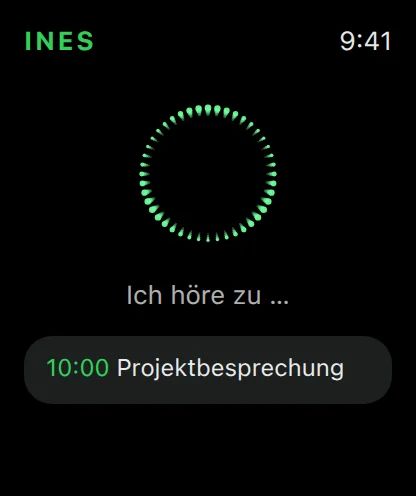
  • ListeningA conversation is in progress, and INES is capturing your voice.
  • ThinkingINES plans the approach and chooses the tools.
  • SearchingIn emails, documents, knowledge, or on the web.
  • WorkingActions run, agents implement.
  • WritingA reply, draft, or report takes shape.
  • 259Actions in its own tool catalog, from email to deployment
  • 12custom skills for Office, design, research, quality and more
  • 4AI providers in the agent team, chosen by task and quota
  • 5native apps: Mac, iPhone, iPad, Vision Pro and Apple Watch
  • 953automated tests in server and apps
  • 1shared memory for everything

Everything connected

One memory for everything you do

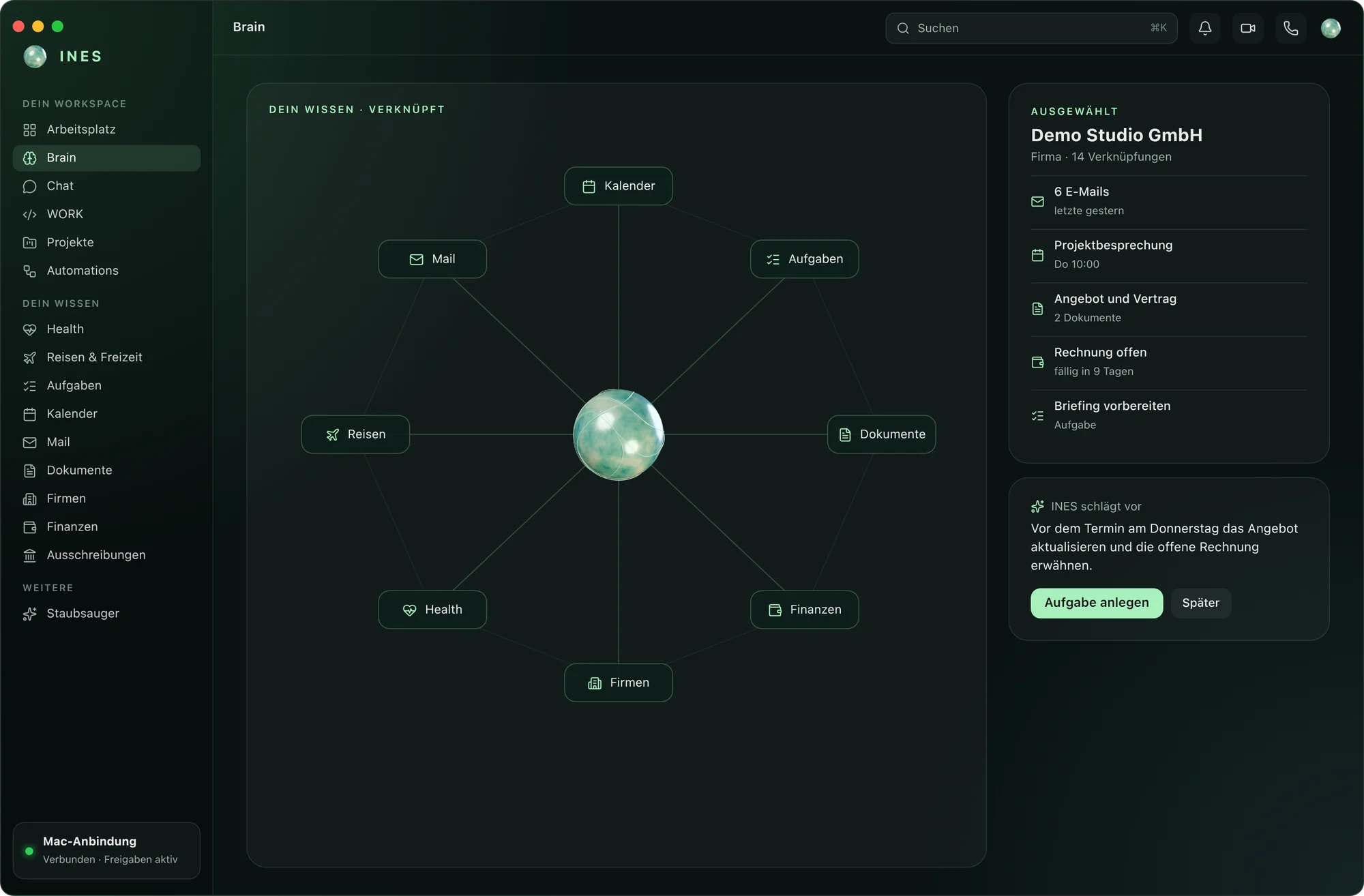
Every email, meeting, invoice and document ends up in the same knowledge graph. INES knows which company belongs to which meeting, which quote is still open and what to do next.

  • Emailreads, sorts, drafts replies
  • Calendarschedules, reschedules, prepares meetings
  • Taskscreates, prioritizes, reminds
  • Documentssearches, summarizes, links
  • Companies & contactskeeps history and relationships
  • Financebank reconciliation, invoices, receipts
INESconnects, plans, executes
  • Public tendersfinds and rates matching tenders
  • Healthsleep, vitals, 3D body atlas
  • Travel & leisureplans options, never books itself
  • Projects & WORKagents build, review, deliver
  • Browserresearches and operates websites
  • Maccontrols apps with your approval
Brain on the Mac: a company with all linked emails, meetings, documents, invoices and tasks
Brain: a company with all its emails, meetings, documents, invoices and tasks. INES suggests the next step.

Platforms

One INES. On every device.

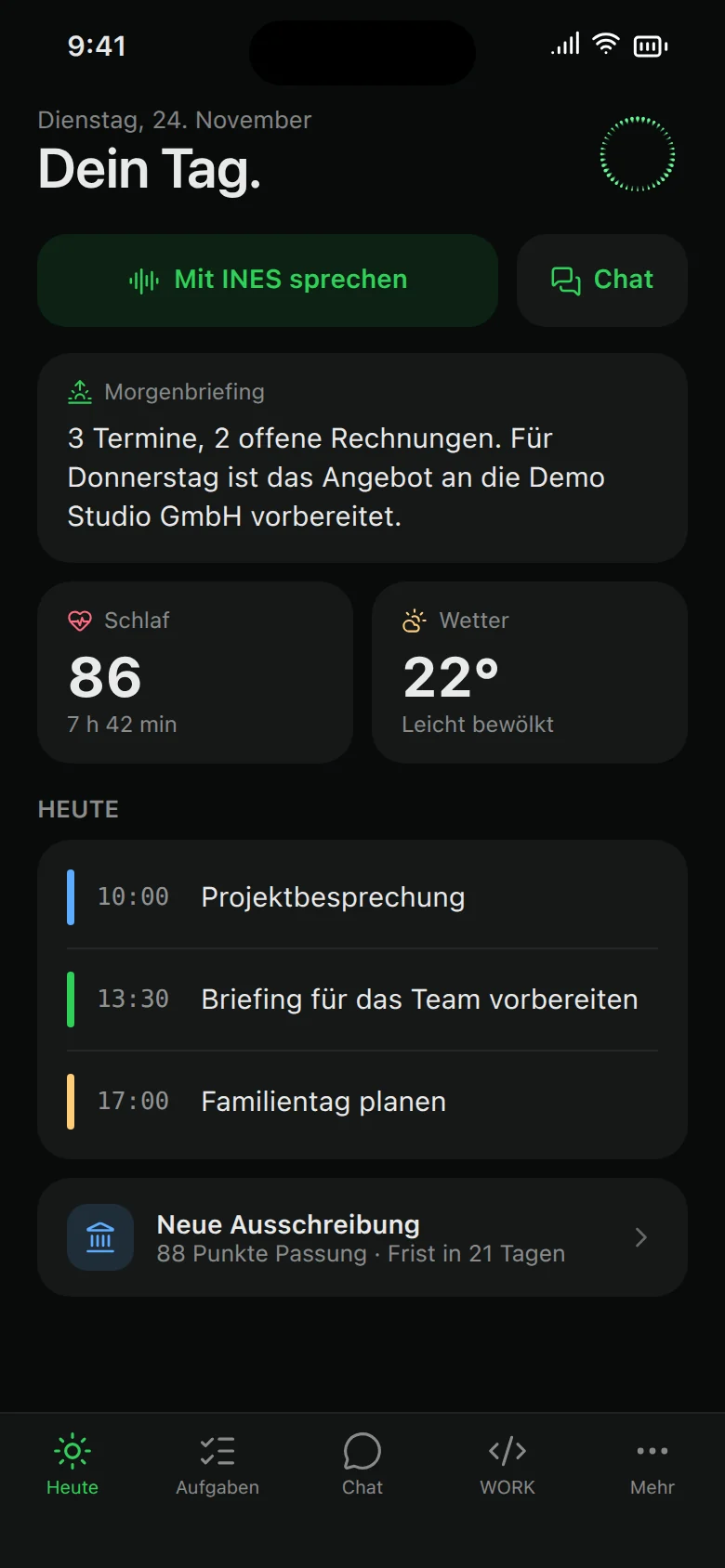
Native apps for Mac, iPhone, iPad, Apple Vision Pro and Apple Watch. All share the same state: what you start on the Mac continues on the iPhone.

  • Mac

    The workspace: agent team, Brain, every area in one sidebar, calls and Mac control.

  • iPhone

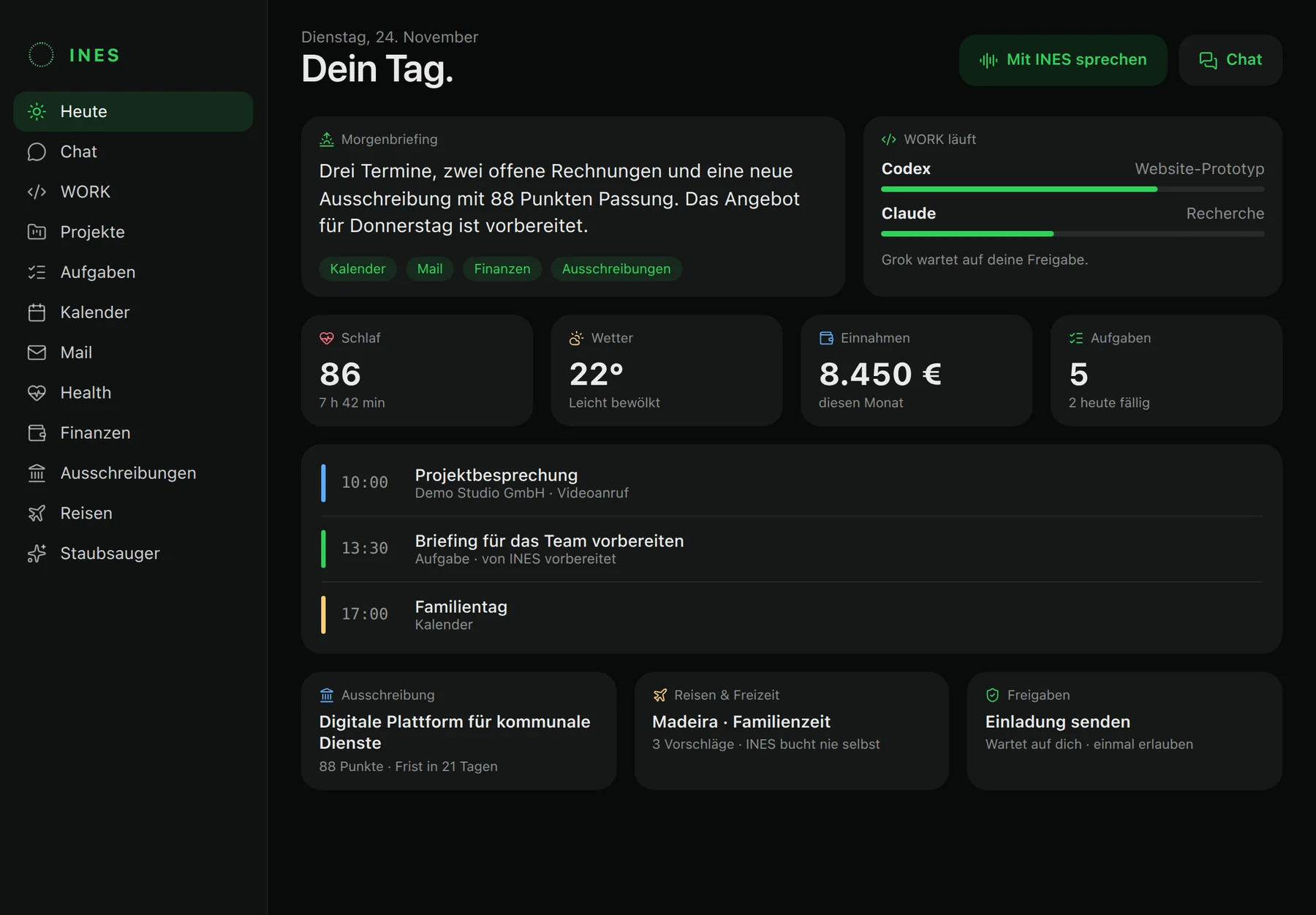
    Your day in your pocket: briefing, chat, voice, approvals, driving mode.

  • iPad

    Every area in a sidebar, made for overview and longer sessions.

  • Vision Pro

    INES in your space: cockpit, agents and health as floating windows.

  • Apple Watch

    Ask a quick question and see your next meeting, right on your wrist.

Renders of the interfaces with demo data. The apps currently run in German.

Health

86Sleep score

INES

Your space for what matters.

Tuesday · 3 meetings · everything in view

Focus5open tasksUp next10:00Project meeting
Talk to INESBrowser

Agent team

Codex72 %Claude45 %GrokApproval

Inbox

Demo Studio GmbHQuestions about the proposalDraft readyMunicipal utilityTender, due FridayTask createdBankNovember statementabgeglichen

WORK · Website relaunch

  1. Pre-check passed
  2. Codex builds the home page
  3. Tests: 48 of 48 passing
  4. Claude reviews the change
  5. Approval requested

Approval

The proposal for Demo Studio is ready. Shall I send it?

Allow onceEdit

Apple Vision Pro

INES is also made for your eyes.

Keep scrolling and look through the headset.

In your space

INES floats in front of you.

The cockpit sits right in your surroundings, with no screen and no desk.

Everything in view

Windows where you need them.

Health and the agent team appear as separate windows next to the cockpit.

Work in the room

And INES gets to work.

Mail gets sorted, a job runs through review and tests, and INES asks you before anything is sent.

Our own illustration with demo data

All areas in detail

What INES manages for you

Sixteen areas, one system. Each area has its own tools, and all share the same memory and the same approvals.

Communication

Everything coming in and going out, in one place and with context.

Email

Two Microsoft 365 accounts with mailbox, drafts, calendar, OneDrive and SharePoint.

  • Reply drafts that know the case
  • Real Outlook drafts with attachments, read back byte for byte
  • Phishing check before anything is created from it
  • Incoming invoices go to accounting
  • Sent emails are matched against open tasks

Voice and calls

Real-time conversation with its own voice. Appointments, tasks, emails, and health data are already loaded when the call starts.

  • Calls from Mac, iPhone, and iPad
  • Dictation with correction
  • Voice memos with checks for cut-off recordings
  • Incoming INES calls after consent

Notifications

Notifications sorted into eight topics and bundled twice a day.

  • Bundled at 8 a.m. and 6 p.m.
  • Reminders and urgent items right away
  • Quiet hours from 10 p.m. to 7 a.m.
  • On iPhone and Mac at the same time

Meetings

Meeting transcripts go into the knowledge base. Tasks are created from the verbatim transcript, not from a summary.

  • Who committed to what
  • With a quote from the minutes
  • Linked to company and project

Organization

Tasks, appointments, and cases that keep themselves up to date.

Tasks

Tasks with revisions, follow-ups, and reminders. Every new task goes through a check first.

  • From emails only with verbatim evidence
  • Duplicates are merged
  • Close once completion is proven
  • Morning top 3, evening reflection, weekly review

Calendar

iCloud and Microsoft calendars in one view, up to 380 days ahead.

  • Work blocks for tasks, checked for conflicts
  • Apply and undo with revision check
  • Partial failures of individual calendars are shown
  • Past times and new overlaps are rejected

Matters and companies

Master data, history and recurring obligations for every company, with legal basis and deadline.

  • Recurring obligations with deadline and legal basis
  • Legal notice details retrieved automatically
  • Management reports (BWA) and KPIs per company
  • Matters as case files

Automations

Recurring workflows on the server, even when no device is on.

  • Daily, at intervals, once or via cron
  • Checks for duplicate jobs before creating
  • Alerts on errors
  • Briefings, reports, reviews

Knowledge and money

A memory with sources, finances with real accounts.

Brain and knowledge

Emails, meetings, and documents become files on projects, people, and topics.

  • Every statement with a verbatim quote from the original
  • Facts, decisions, open items, corrections
  • Outdated as soon as the source changes
  • Local semantic search, no third-party API

Documents and reports

A library with versions and full-text search. Word, Excel, PowerPoint, and PDF in your own corporate design.

  • Originals remain unchanged
  • Secrets detected and blocked on import
  • Reports as a native view and Markdown
  • Search across documents, chats and projects

Finance

Bank accounts via the PSD2 interface, sorted and assessed.

  • Transactions categorized, internal transfers detected
  • Loans and outstanding balance
  • Receipts sent to Lex+ accounting
  • Transfer to accounting only at your request

The daily reconciliation runs once the bank connections are linked.

Public tenders

Public tenders from official sources, prefiltered and rated.

  • Rated by suitability, performance, and price
  • Shortlist with evidence and reasons for exclusion
  • Loading public documents
  • No conclusions from a score alone

Everyday life and devices

INES also helps outside the office, on every device.

Health

Apple Health data every day, with an archive and traceable analysis.

  • Sleep, activity and vital signs
  • ECG interpretation
  • Scale readings from a photo
  • 3D body atlas and health chat

Travel

Travel dossiers from public sources, with evidence.

  • Suggestions with evidence
  • Only public sources, retrieved over encrypted connections
  • INES never books anything itself

Browser agent

Its own browser that researches, fills out forms, and monitors pages.

  • Live view in the Mac app
  • Uploads and screenshots
  • Monitor websites for changes
  • Logins stay in the server browser

Mac

INES sees the screen and operates apps if you allow it on the device.

  • Explains what is on screen right now
  • Clicks and types for you
  • Every device task needs your approval
  • Stop all Mac actions with one shortcut

WORK

One job, four AI providers

INES doesn't work with one model but with a team. Each provider gets what it is good at, and another one checks the result.

  • AutoINES recognizes from the task what is needed.
  • CodingApps, websites, servers, with tests.
  • DocumentsWord, Excel, PowerPoint, PDF, with verified rendering.
  • DesignDrafts, Figma, images, presentations.
  • ResearchSources, comparisons, strategies.
  • Claude

    Anthropic
    • Documents, presentations, and design
    • Architecture, security, and migrations
    • First to review other models' work
    • Chooses the reasoning depth by task
  • Codex

    OpenAI
    • Hard bugs, data loss, production issues
    • Builds new INES capabilities
    • Second reviewer when Claude is unavailable
    • Images for design jobs
  • Grok

    xAI
    • Research and summaries with sources
    • In everyday use
    • Takes turns with Claude in the Vacuum
  • GLM

    Z.ai
    • Small, clearly defined changes
    • In everyday use
    • Only for development jobs

How a job runs

  1. 01

    Job

    By chat, voice, or file. A mode steers the work but grants no permissions.

  2. 02

    Pre-check

    Does the run already exist? Is the project active, the provider connected, the computer reachable? Otherwise nothing starts.

  3. 03

    Choice of provider

    Fixed rules by task type, then available quota. In a tie, the less busy provider.

  4. 04

    Implementation

    One writer per project, no conflicts. Clearly scoped work packages go to a second model with acceptance criteria.

  5. 05

    Independent review

    Work by Grok or GLM is automatically reviewed by Claude, or by Codex as a fallback. If no reviewer is available, the review waits; it is never skipped.

  6. 06

    Approval and go-live

    Goal, status, tests and rollback are logged. Only what is approved goes live.

You decide how thorough

  • Low

    Direct and focused. Functional and security checks remain mandatory.

  • Medium

    The standard path: implementation with tests and independent review.

  • High

    Define acceptance criteria, prove root causes, evaluate two approaches, cross-check with edge cases and regression tests.

  • Extreme

    Four separate reviews: requirements, cross-check, user perspective, acceptance. Evidence is stored in the project.

Within a project, only one agent writes at a time. Across multiple projects, up to four providers work simultaneously.

Vacuum

Spare capacity becomes projects

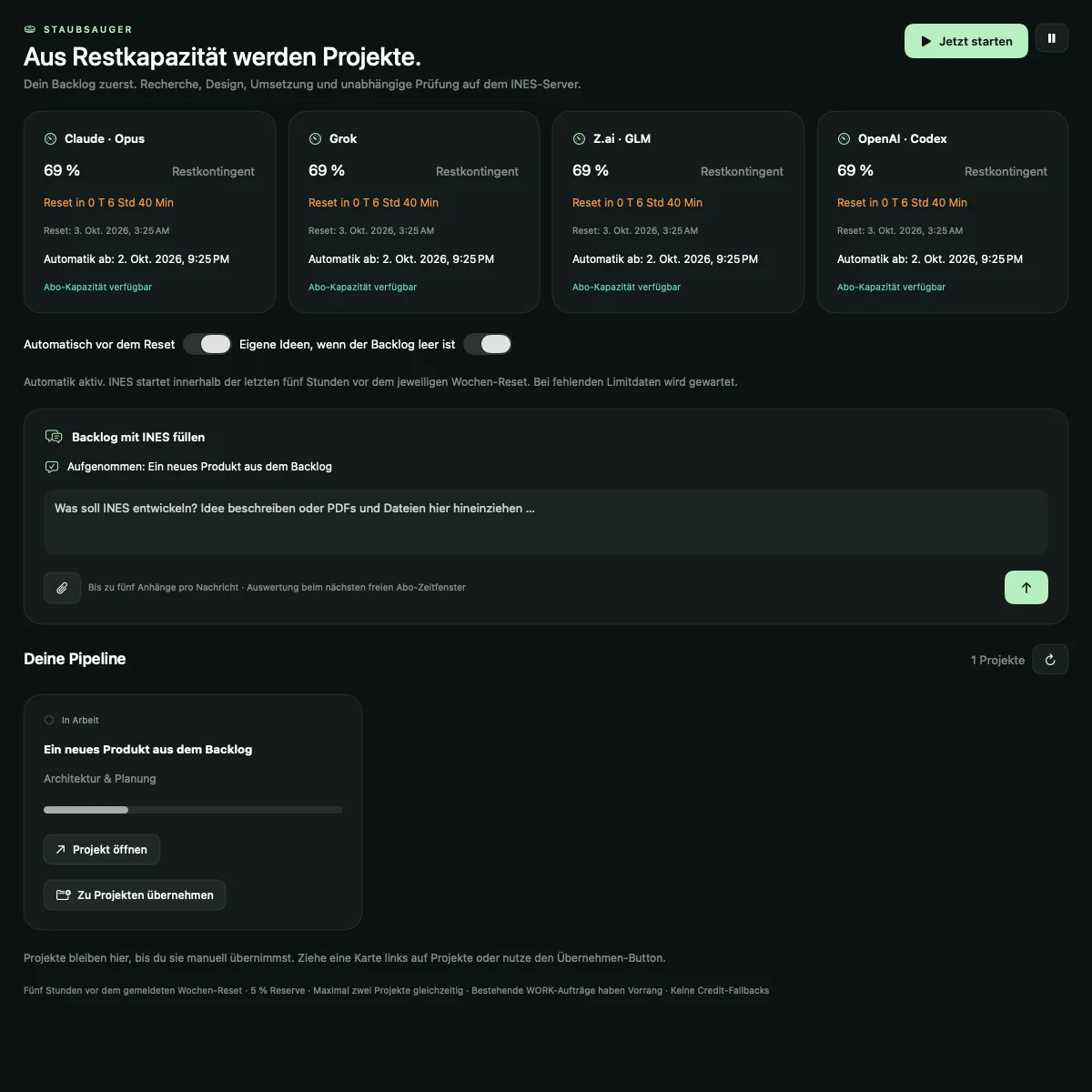
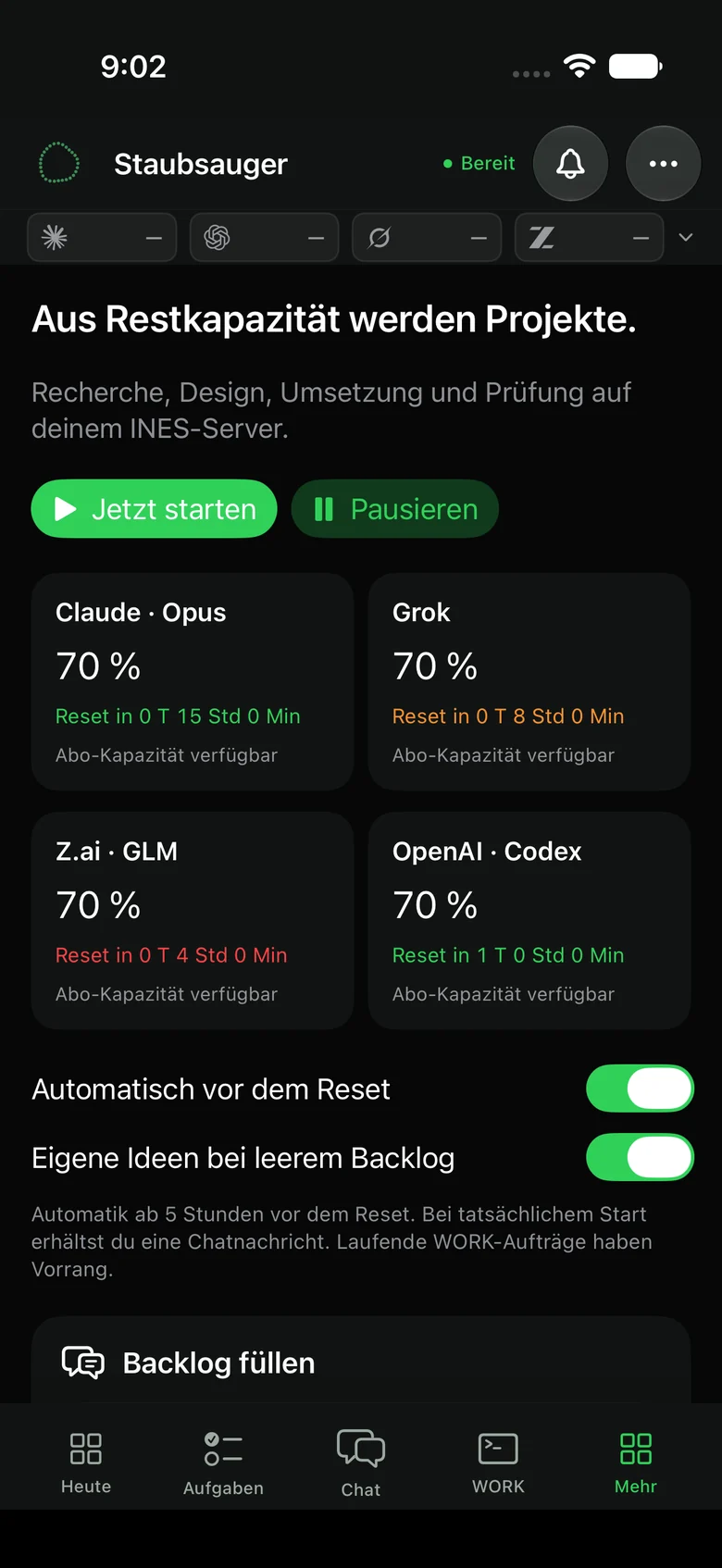
If capacity is left in the AI subscriptions before the reset, the Vacuum starts projects from the backlog on its own. Each project goes through seven phases from research to acceptance, with Grok and Claude taking turns and reviewing each other. Several project teams run in parallel, and paid backup quotas are never tapped.

  • Ideas go into the backlog as text or files
  • Countdown to the reset for each model
  • Results only join your projects once you accept them
Vacuum on the Mac: remaining quota of four models, backlog and pipeline
Vacuum on iPhone: countdown and remaining quota per model

Real captures of the apps with synthetic data, interface in German.

Pre-checks

Check first, then act

Before INES creates, starts, sends, or publishes anything, fixed checks run. They prevent duplicates, wrong deadlines, and actions nobody wanted.

Before a task is created

  • Does it belong to an existing task? Then add to it instead of duplicating.
  • Only cc'd or already done? Then no task.
  • Is a real person waiting, or just a machine?
  • Required: a verbatim quote from the email, no invented deadlines.
  • Phishing is detected first, and one email creates at most one task.

Before a job starts

  • The same run number with different content is rejected.
  • Archived projects, disconnected providers, and unresponsive machines do not start.
  • No provider switch while a run is active or a question is pending.
  • Schedules are checked for duplicate jobs before they are created.

Before an email goes out

  • Valid recipients, no more than ten attachments totaling 30 MB.
  • The draft is read back: subject, recipients, body, and attachments, byte for byte.
  • Sent only after your confirmation with a code and expiry time.
  • If the outcome is unclear, it is checked instead of sent again.

Before an appointment is scheduled

  • Every existing appointment is read before writing.
  • Aborts if blocks have changed, the fetch is incomplete, or new overlaps appear.
  • Undo only if the block is unchanged.
  • Missing time estimates are marked as provisional.

Before anything goes live

  • Required details: goal, exact status, plan, tests, rollback.
  • An approval is valid for 30 minutes for exactly this scope.
  • Booking, payments, and sending stay locked until you approve.
  • After each live step, the result is logged.

Skills

Twelve skills that keep growing

Skills are work instructions with tools and verification steps. They turn a model into a specialist, for example for Excel with recalculated formulas or for presentations whose slides are checked one by one.

  • OfficeEdit Excel and Word files, recheck formulas, preserve formatting.
  • PresentationsEditable slide decks with a storyboard, every slide checked before delivery.
  • DesignBriefings, Figma layouts, and visuals.
  • Distinctive designWebsites, presentations and PDFs with a distinctive signature.
  • Research and strategySource-based strategies, comparisons and decision papers.
  • Source knowledgeProject knowledge from documents, scans and meetings, with source references.
  • BrowserOperate websites, download documents and verify workflows.
  • CoworkOffice, research, and design jobs with handoff to development.
  • Release qualitySecurity, accessibility, data protection, App Store and recovery.
  • Product demoShort launch videos from real product footage.
  • Clear writingConcise German texts without filler.
  • Self-developmentINES extends itself, tested and reviewed.

If something is missing, INES builds it itself

  1. 01

    Gap detected

    If your task needs a capability that is missing, INES records the goal, origin, and expected actions.

  2. 02

    Built in-house

    A development run at the highest review level builds the capability into INES.

  3. 03

    Checked

    Regression tests in an isolated environment, two independent model reviews, backup.

  4. 04

    Enabled

    Only once the new version is running and all expected actions are available. Otherwise, automatic rollback.

  5. 05

    Continued

    Exactly one continuation in the original project. Completed steps are not repeated.

New integrations are tested in advance and are then immediately available in chat and in WORK, without a restart.

No dead ends

INES finds a way

Limits, outages, and blocks are part of everyday work with AI. INES is built to keep working instead of stopping at an error message. Where access is missing, INES names the specific gap.

Job · Website relaunchFilesContextMode
  • ClaudeLimit reached · paused until reset
  • Codex takes over
  • Grok
  • GLM
Example: Claude reaches its limit, Codex continues the same job.
  • Limit reached

    The provider pauses until its reset, and the work moves to the next one with files, context, and mode.

  • Provider overloaded

    A short pause; jobs that haven't started yet are rerouted beforehand.

  • Interrupted connection

    Every write action has a fixed number. A repeat returns the stored result instead of a duplicate.

  • Unclear outcome

    INES first reads the actual state and then acts, instead of blindly repeating.

  • Service hung

    A watchdog checks every two minutes and restarts services, with no AI in between.

  • Errors after an update

    A snapshot before every update, a health check afterward, automatic rollback on errors.

  • Blocker in a job

    Establish the cause, search the tool catalog, skills and project knowledge, evaluate at least two approaches and test the safe alternative.

  • Missing capability

    INES builds it itself, checks it, and then resumes the original task.

Comparison

An AI chat on its own or INES

Claude is one of the models in INES. The difference lies in the system around it: tools, memory, checks, and persistence.

TopicAn AI chat on its ownINES
ModelsAn AI chat on its ownOne provider, one model per conversationINESFour providers, chosen by task and available quota
Taking actionAn AI chat on its ownAnswers and suggests, you do the workINES259 actions across email, calendar, tasks, finance, browser, Mac, and development, with every result read back
MemoryAn AI chat on its ownWhat's in the conversation or the projectINESA knowledge network across emails, meetings, documents, and projects, every statement backed by an original quote
QualityAn AI chat on its ownThe model checks itselfINESA separate review run by a different model, with four separate reviews at the highest level
LimitsAn AI chat on its ownWhen the quota runs out, you have to waitINESHandover to the next provider with files and context, continuing without a restart
CapabilitiesAn AI chat on its ownWhat the product comes withINES12 custom skills, new integrations usable right away, and INES builds missing capabilities itself
TermAn AI chat on its ownAs long as the window is openINESOn its own server, with schedules and background projects, even at night
ControlAn AI chat on its ownApprovals depending on the toolINESFixed pre-checks, approvals that expire, a log, and rollback

On the road and in calls

Drive, talk, present

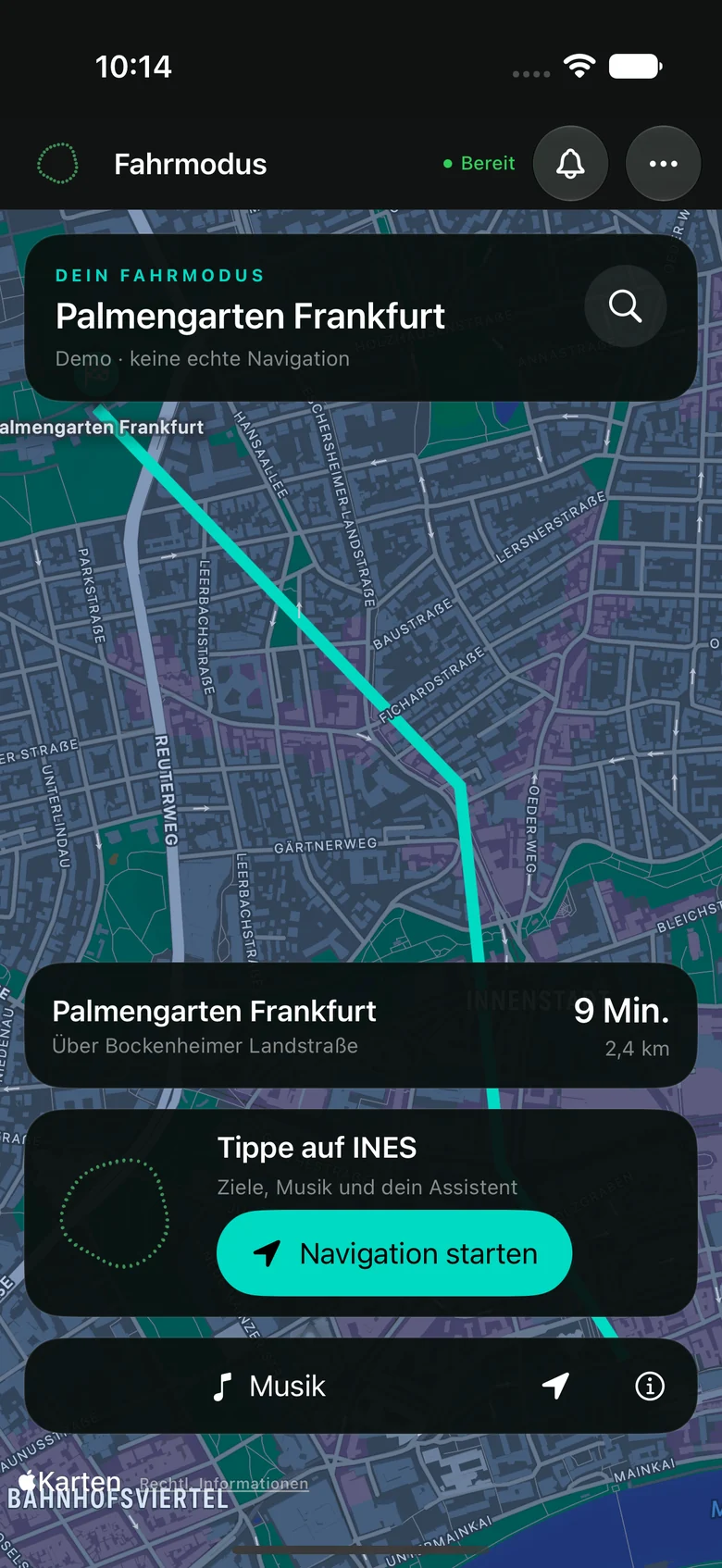
Driving mode on iPhone: map with route, destination, music and a button for INES

Driving mode

Destination by voice, routing with Apple Maps, music and INES on large touch targets. Apple CarPlay follows once Apple approves it.

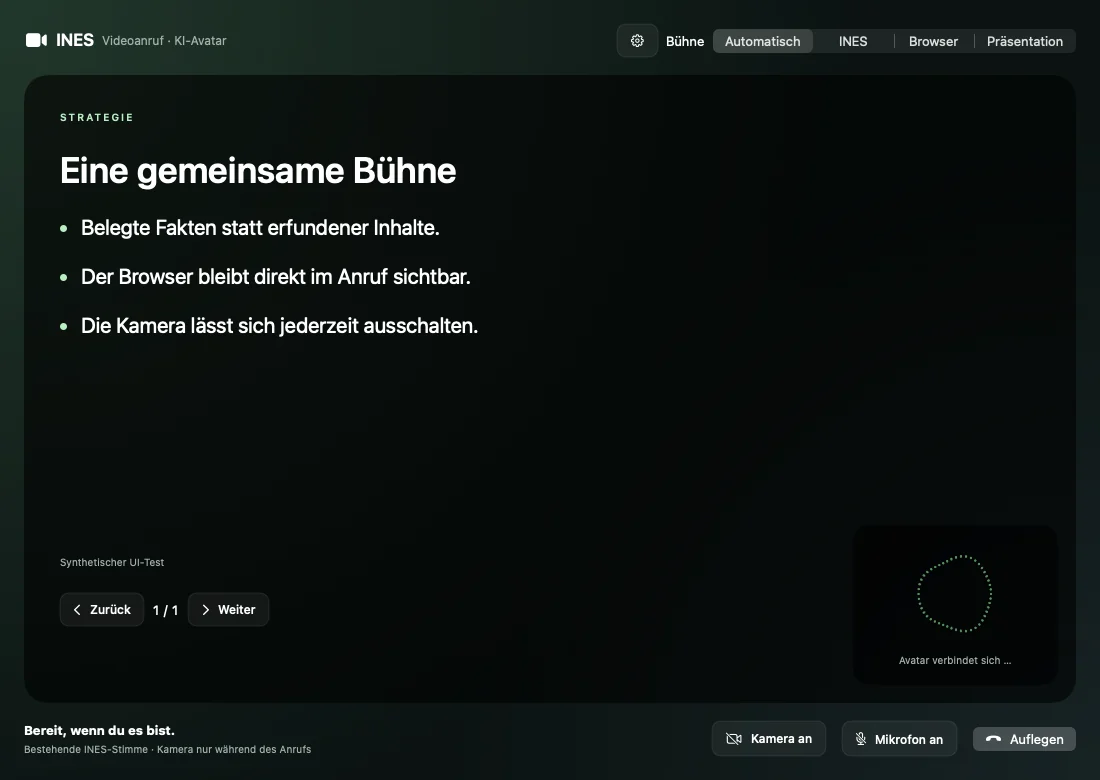
Video call on the Mac: INES shows slides on a shared stage

Video call with a stage

During a call, INES shows slides and the browser on a shared stage. You can switch off camera and microphone at any time. A dedicated video avatar is in preparation.

Approval in chat: INES asks before sending an invitation

Security and approvals

INES acts. You decide.

A system with this much access needs clear limits. They are built in, not bolted on afterwards.

  1. Approval before every critical action

    Sending, deleting, paying or controlling devices: INES asks first. A tap on “Allow once” covers exactly that one action.

  2. Agents never approve themselves

    No agent can approve its own request. Approvals only come from you.

  3. Time-limited device access

    Access to the Mac, screen or microphone expires after a fixed time.

  4. Keys stay on the server

    Credentials for services live only on our own server and never reach the apps or the models.

  5. Never books or pays on its own

    INES prepares trips, purchases and payments. You complete them.

  6. Daily backup

    The database and documents are backed up to a second server every day, and restores are tested.

Self-development

INES extends itself. With review.

New features are built on request by its own agents. Nothing goes live before the tests and two independent models have signed off, and every step has a rollback.

  1. Develop

    An agent builds the requested feature in a separate working copy, at the highest review level.

  2. Testing

    Regression tests run to completion in an isolated environment.

  3. Cross-check

    Claude and Codex review the change independently of each other.

  4. Activate

    With a backup and a runtime check. Only then is the new version considered live.

  5. Roll back

    If something fails, INES automatically rolls back to the previous state.

For your company

Your own system like INES

Agents with access to your systems, approvals and audit logs, voice control and apps for your team. We build it from the same building blocks, on servers in Germany.

INES

Common questions

Tap a question.